Beth Gardner has updated her posts on the VBA6.dll issue with GP 2010 and Office 2010.
She has added a link to a download that apparently fixes the issue.
On my 64-bit Server 2008 R2 server, I was able to change the registry to fix the issue, but after logging into the server again, the error would occur again. And it seems several customers had slightly different variants of the issue that required slightly different fixes.
I just installed the fix on my server, and viola!, the VBA6.dll error is no more!
Hopefully this resolution solves the problem permanently.
Wednesday, March 16, 2011


Tuesday, March 15, 2011
Dynamics World Top 100 Voting Open
It's always an honor to be nominated, that is the truth no matter how cliche it has become (many thanks, Oscar). The voting has officially begun for Dynamics World's Top 100 Most Influential Dynamics People list. Steve and I were both surprised and honored to be included in the nominations this year. Steve for his technical blog posts that seem to get at the detailed root of issues with development and Dynamics GP, and myself for my application-based posts and work with the Dynamics GP Microsoft Learning Curriculum and certification exams. But regardless of who you vote for, get out there and vote for those that influence you! I always love to see the final list, and find myself coming back to those that make the list as resources time and time again.
http://www.dynamicsworld.co.uk/2011Voting.php
http://www.dynamicsworld.co.uk/2011Voting.php
Forgot the FUTA? Slacking on SUTA? Fix it now!
I know, I know, I know...I am on a payroll bender lately. I promise more diverse topics soon :) But here is one last payroll fixin' blog post.
Despite our best efforts, pay codes are sometimes set up incorrectly. Pay codes that should have been marked as FUTA and/or SUTA taxable are not. Or, even worse, the Pay Code Setup (Tools>>Setup>>Payroll>>Pay Code) is correct but the employee record has been changed (Cards>>Payroll>>Pay Code). Unlike other taxes, FUTA and SUTA are not calculated and posted on a per payroll basis. These entries are generated from the Period End Payroll Reports window (Reports>>Payroll>>Period End). For this reason, discrepancies in FUTA and SUTA wages are often not uncovered until after payroll(s) has been completed.
So what do you do if you process a payroll (or multiple payrolls) for an employee (or multiple employees) with a pay code that has incorrectly NOT been marked as FUTA and SUTA taxable? Correcting manually can be a chore, especially if mulitple records are involved. You would have to back out the wages using a Manual Check/Beginning Balance (Transactions>>Payroll>>Manual Checks), while the pay code FUTA and SUTA boxes are NOT marked. Post. And then re-enter the wages in the same manner while the pay code FUTA and SUTA boxes ARE marked. Ugh. Time consuming and with a high potential for error.
Thinking that there has to be a better way, I went hunting in the payroll tables and found that the FUTA and SUTA summary reports (Reports>>Payroll>>Period End) rely on the Payroll Transaction History (UPR30300) table for two specific fields:
--Shows employee historical transactions that do not have a SUTA state, but the pay code setup record does have the SUTA tax flag marked
select UPR30300.EMPLOYID as EmployeeID, UPR30300.CHEKNMBR as CheckNumber, UPR30300.YEAR1 as TrxYear, UPR30300.CHEKDATE as CheckDate, UPR30300.PAYROLCD as PayCode, UPR30300.UPRTRXAM as TrxAmount, UPR30300.SUTASTAT as SUTAState, UPR30300.SBJTFUTA as SubjectToFUTA, UPR40600.PAYRCORD AS PayCodeSetup, UPR40600.SBJTFUTA AS SubjectToFUTASetup, UPR40600.SBJTSUTA AS SubjectToSUTASetup FROM UPR30300 INNER JOIN UPR40600 ON UPR30300.PAYROLCD=UPR40600.PAYRCORD WHERE UPR30300.SUTASTAT='' AND UPR40600.SBJTSUTA=1 AND UPRTRXAM>0.00
--Shows employee historical transactions that are not marked as subject to FUTA, but the pay code setup record does have the FUTA tax flag marked
select UPR30300.EMPLOYID as EmployeeID, UPR30300.CHEKNMBR as CheckNumber, UPR30300.YEAR1 as TrxYear, UPR30300.CHEKDATE as CheckDate, UPR30300.PAYROLCD as PayCode, UPR30300.UPRTRXAM as TrxAmount, UPR30300.SUTASTAT as SUTAState, UPR30300.SBJTFUTA as SubjectToFUTA, UPR40600.PAYRCORD AS PayCodeSetup, UPR40600.SBJTFUTA AS SubjectToFUTASetup, UPR40600.SBJTSUTA AS SubjectToSUTASetup FROM UPR30300 INNER JOIN UPR40600 ON UPR30300.PAYROLCD=UPR40600.PAYRCORD WHERE UPR30300.SBJTFUTA=0 AND UPR40600.SBJTFUTA=1 AND UPRTRXAM>0.00
Despite our best efforts, pay codes are sometimes set up incorrectly. Pay codes that should have been marked as FUTA and/or SUTA taxable are not. Or, even worse, the Pay Code Setup (Tools>>Setup>>Payroll>>Pay Code) is correct but the employee record has been changed (Cards>>Payroll>>Pay Code). Unlike other taxes, FUTA and SUTA are not calculated and posted on a per payroll basis. These entries are generated from the Period End Payroll Reports window (Reports>>Payroll>>Period End). For this reason, discrepancies in FUTA and SUTA wages are often not uncovered until after payroll(s) has been completed.
So what do you do if you process a payroll (or multiple payrolls) for an employee (or multiple employees) with a pay code that has incorrectly NOT been marked as FUTA and SUTA taxable? Correcting manually can be a chore, especially if mulitple records are involved. You would have to back out the wages using a Manual Check/Beginning Balance (Transactions>>Payroll>>Manual Checks), while the pay code FUTA and SUTA boxes are NOT marked. Post. And then re-enter the wages in the same manner while the pay code FUTA and SUTA boxes ARE marked. Ugh. Time consuming and with a high potential for error.
Thinking that there has to be a better way, I went hunting in the payroll tables and found that the FUTA and SUTA summary reports (Reports>>Payroll>>Period End) rely on the Payroll Transaction History (UPR30300) table for two specific fields:
- SBJTFUTA - Subject to FUTA: set to 1 if subject to FUTA, 0 if not
- SUTASTAT- SUTA State: populated with the approprate state if subject to SUTA, blank if not
--Shows employee historical transactions that do not have a SUTA state, but the pay code setup record does have the SUTA tax flag marked
select UPR30300.EMPLOYID as EmployeeID, UPR30300.CHEKNMBR as CheckNumber, UPR30300.YEAR1 as TrxYear, UPR30300.CHEKDATE as CheckDate, UPR30300.PAYROLCD as PayCode, UPR30300.UPRTRXAM as TrxAmount, UPR30300.SUTASTAT as SUTAState, UPR30300.SBJTFUTA as SubjectToFUTA, UPR40600.PAYRCORD AS PayCodeSetup, UPR40600.SBJTFUTA AS SubjectToFUTASetup, UPR40600.SBJTSUTA AS SubjectToSUTASetup FROM UPR30300 INNER JOIN UPR40600 ON UPR30300.PAYROLCD=UPR40600.PAYRCORD WHERE UPR30300.SUTASTAT='' AND UPR40600.SBJTSUTA=1 AND UPRTRXAM>0.00
--Shows employee historical transactions that are not marked as subject to FUTA, but the pay code setup record does have the FUTA tax flag marked
select UPR30300.EMPLOYID as EmployeeID, UPR30300.CHEKNMBR as CheckNumber, UPR30300.YEAR1 as TrxYear, UPR30300.CHEKDATE as CheckDate, UPR30300.PAYROLCD as PayCode, UPR30300.UPRTRXAM as TrxAmount, UPR30300.SUTASTAT as SUTAState, UPR30300.SBJTFUTA as SubjectToFUTA, UPR40600.PAYRCORD AS PayCodeSetup, UPR40600.SBJTFUTA AS SubjectToFUTASetup, UPR40600.SBJTSUTA AS SubjectToSUTASetup FROM UPR30300 INNER JOIN UPR40600 ON UPR30300.PAYROLCD=UPR40600.PAYRCORD WHERE UPR30300.SBJTFUTA=0 AND UPR40600.SBJTFUTA=1 AND UPRTRXAM>0.00
Sunday, March 13, 2011
Managing Microsoft Dynamics Implementations? Exam? EEEEK!
Partners! Do you still need to pass the Managing Microsoft Dynamics Implementations exam? Are you still in denial? :) Join me for an online study hall on Friday March 25th.
Below is an abstract of the session....
Prepare for the Managing Microsoft Dynamics Implementation exam (MB5-858) by attending this study hall. The session will include a review of key concepts important in studying for the exam. The exam preparation guide will be reviewed, and related components of Sure Step will be discussed to help focus your study plan.
And you can register here...
https://training.partner.microsoft.com/learning/app/management/LMS_ActDetails.aspx?UserMode=0&ActivityId=733895
There are other study halls planned, below is the communication from Microsoft:
Ask the Experts: MPN Study Hall Series
Join us for sixty minute study hall sessions for Sure Step, 2win, and Solution Selling that have been created to align core curriculum that comprises the sales and presales exams, but is intended as a high-level review for individuals who have already completed the courses. Participants will also have the opportunity to ask the subject matter experts questions in areas that they may be struggling to apply concepts or areas of weakness on the exam.
· March 25 at 9:00 AM PST – Sure Step
· April 1 at 9:00 AM PST – 2Win
· April 20 at 9:00 AM PST - Solution Selling (Part 1 of 3)
· April 21 at 9:00 AM PST - Solution Selling (Part 2 of 3)
· April 27 at 9:00 AM PST - Solution Selling (Part 3 of 3)
https://mbs.microsoft.com/partnersource/worldwide/northamerica/us_recent/asktheexpert.
Below is an abstract of the session....
Prepare for the Managing Microsoft Dynamics Implementation exam (MB5-858) by attending this study hall. The session will include a review of key concepts important in studying for the exam. The exam preparation guide will be reviewed, and related components of Sure Step will be discussed to help focus your study plan.
And you can register here...
https://training.partner.microsoft.com/learning/app/management/LMS_ActDetails.aspx?UserMode=0&ActivityId=733895
There are other study halls planned, below is the communication from Microsoft:
Ask the Experts: MPN Study Hall Series
Join us for sixty minute study hall sessions for Sure Step, 2win, and Solution Selling that have been created to align core curriculum that comprises the sales and presales exams, but is intended as a high-level review for individuals who have already completed the courses. Participants will also have the opportunity to ask the subject matter experts questions in areas that they may be struggling to apply concepts or areas of weakness on the exam.
· March 25 at 9:00 AM PST – Sure Step
· April 1 at 9:00 AM PST – 2Win
· April 20 at 9:00 AM PST - Solution Selling (Part 1 of 3)
· April 21 at 9:00 AM PST - Solution Selling (Part 2 of 3)
· April 27 at 9:00 AM PST - Solution Selling (Part 3 of 3)
https://mbs.microsoft.com/partnersource/worldwide/northamerica/us_recent/asktheexpert.
Sunday, March 6, 2011
SQL Reporting Services and Dynamics GP and Report Models- Grrrr....
I love SQL Reporting Services, let me say that right away. I also love Dynamics GP. And I love the standard SQL Reporting Services reports that come with Dynamics GP. However, and this is a BIG however, I always cringe just a little bit when I am asked to make a modification to one of them. And I should also put a big disclaimer that I am not a developer and am often humbled when it comes to my own technical skills.
Why you ask? Well, I might be showing a bit of my non-technical self here by saying that when the report is based on a report model, I cringe a thousand cringes :) Sometimes I luck out and the field I need is already part of the report and I just have to move it, or sum it, or something simple like that. But a request that came to me last week was not that simple although it sounded innocent enough. The client just wanted the employee name to the Employee Pay History report. Easy right? And an obvious request since most folks don't memorize every employee's ID.
So, I open visual studio and the source project (yes, the source projects are available here on PartnerSource and CustomerSource). And I open up the Employee Pay History report, and flip to the Data tab and the dsGPS10UPR dataset. Looks simple enough right?

Now, I just need to drag the First Name and Last Name fields on to the dataset. So I do that.

So I immediately notice the automatic grouping. So I remove the fields, and try adding them in different locations, I attempt to deleting the grouping. Nothing seems to work. And if I generate the report, I get duplication of records due to the grouping. Ugh.
Now I know that many of you probably already know the solution to this dilemma. But I didn't at the time. And I spent a couple hours spinning my wheels and trying a variety of solutions including a number of completely fruitless internet searches--where I concluded that Report Models are definitely underused :)
But then I started looking at the underlying XML--by clicking on the Edit Selected Dataset ellipsis next to the Dataset name dropdown list.
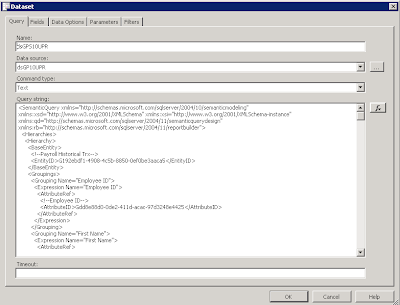
In looking at the XML, I found the node dealing with subtotal sets and specifically the subtotal by Employee ID and First Name.

And I remove every line between SubtotalSet and /SubtotalSet. But when I flip back to view the Dataset, I still have a subtotal by Employee ID which I did not have on the original.

So I edit the Dataset again, this time remove the entire section between SubtotalSet and /SubtotalSet.


So then it is just a matter of adding the fields to the report itself.


Thought I would share my experience with this, just because there doesn't seem to be a lot out there regarding using models and specifically working with the Dynamics GP source projects.
Why you ask? Well, I might be showing a bit of my non-technical self here by saying that when the report is based on a report model, I cringe a thousand cringes :) Sometimes I luck out and the field I need is already part of the report and I just have to move it, or sum it, or something simple like that. But a request that came to me last week was not that simple although it sounded innocent enough. The client just wanted the employee name to the Employee Pay History report. Easy right? And an obvious request since most folks don't memorize every employee's ID.
So, I open visual studio and the source project (yes, the source projects are available here on PartnerSource and CustomerSource). And I open up the Employee Pay History report, and flip to the Data tab and the dsGPS10UPR dataset. Looks simple enough right?

Now, I just need to drag the First Name and Last Name fields on to the dataset. So I do that.

So I immediately notice the automatic grouping. So I remove the fields, and try adding them in different locations, I attempt to deleting the grouping. Nothing seems to work. And if I generate the report, I get duplication of records due to the grouping. Ugh.
Now I know that many of you probably already know the solution to this dilemma. But I didn't at the time. And I spent a couple hours spinning my wheels and trying a variety of solutions including a number of completely fruitless internet searches--where I concluded that Report Models are definitely underused :)
But then I started looking at the underlying XML--by clicking on the Edit Selected Dataset ellipsis next to the Dataset name dropdown list.

In looking at the XML, I found the node dealing with subtotal sets and specifically the subtotal by Employee ID and First Name.

And I remove every line between SubtotalSet and /SubtotalSet. But when I flip back to view the Dataset, I still have a subtotal by Employee ID which I did not have on the original.

So I edit the Dataset again, this time remove the entire section between SubtotalSet and /SubtotalSet.

That does the trick! Now I have no more subtotals in my Dataset.

So then it is just a matter of adding the fields to the report itself.

I even got superfancy and used an expression to concatenate the First Name and Last Name.

Christina Phillips is a Microsoft Certified Trainer and Dynamics GP Certified Professional. She is a supervising consultant with BKD Technologies, providing training, support, and project management services to new and existing Microsoft Dynamics customers.
Wednesday, March 2, 2011
Consultant Tools Series: Instant SQL Formatter
If you have ever viewed the SQL text for a Microsoft Dynamics GP stored procedure, you have probably had to reformat it from its single-line format into something more readable. By default, most of the stored procedures seem to stretch forever on a single line, and adding appropriate line breaks and formatting is quite tedious.
A few weeks ago, my colleague Andrew Dean told me about the Instant SQL Formatter web site. This fantastically handy web site will take a messy or unformatted SQL statement and reformat it into a very nicely formatted version.
I was reminded about it today at the Dynamics GP Technical Conference when Jen Olsen referenced the site during her SRS Reporting in Dynamics GP 2010 R2 presentation. She shared that she uses the Instant SQL Formatter web site regularly to reformat the stored procedures that are used by the Dynamics GP SSRS reports.
If you do use the site, make sure to pay attention to the formatting options on the right side of the page. Jen recommended setting the 3 case options at the top to "Unchanged" to ensure that no changes are made to the actual text of the SQL statements.
Very handy service!
Steve Endow is a Dynamics GP Certified Trainer and Dynamics GP Certified Professional. He is also the owner of Precipio Services, which provides Dynamics GP integrations, customizations, and automation solutions.
http://www.precipioservices.com
A few weeks ago, my colleague Andrew Dean told me about the Instant SQL Formatter web site. This fantastically handy web site will take a messy or unformatted SQL statement and reformat it into a very nicely formatted version.
I was reminded about it today at the Dynamics GP Technical Conference when Jen Olsen referenced the site during her SRS Reporting in Dynamics GP 2010 R2 presentation. She shared that she uses the Instant SQL Formatter web site regularly to reformat the stored procedures that are used by the Dynamics GP SSRS reports.
If you do use the site, make sure to pay attention to the formatting options on the right side of the page. Jen recommended setting the 3 case options at the top to "Unchanged" to ensure that no changes are made to the actual text of the SQL statements.
Very handy service!
Steve Endow is a Dynamics GP Certified Trainer and Dynamics GP Certified Professional. He is also the owner of Precipio Services, which provides Dynamics GP integrations, customizations, and automation solutions.
http://www.precipioservices.com
Tuesday, March 1, 2011
Dynamics GP Technical Conference Presentation Topics
It's a toasty 7 degrees Fahrenheit here in Fargo at the moment, and with the 10-20 mph winds the temperature is well below zero.
The weather hasn't been a deterrent for the large crowd here that is filling the Microsoft building to near capacity.
A lot of content is being covered this week, but I thought I would share some of the key topics that have been mentioned so far.
GP 2010 R2, scheduled to be released in May 2011 is slated to include a new business intelligence application, which is an interesting new report / dashboard / KPI display tool. It can apparently be installed as a stand alone client application on machines that do not have GP installed, and it is also integrated into GP, so your BI reports and graphs can be displayed on the GP home page and in the GP navigation panes. On the surface, the demo reports and charts look similar to the GP home page 'metrics', but are vastly more powerful, as the content is delivered via SQL Server Reporting Services reports, and the tool has functionality to allow users to perform basic modifications to the report design and data.
GP 2010 R2 also includes new features and tools for the Word templates, making it easier to customize the Word templates. The functionality that was covered was pretty deep and had quite a bit of technical details, so I wasn't able to digest all of it, but it looks like some of the Word template modifications will require a developer, or someone who is comfortable working with Visual Studio and OpenXML.
And another very cool feature that should be released with GP 2010 R2 is a new version of the Rapid Migration Tool that allows you to use Excel templates to import data to GP. So, rather than trying to read the database of another ERP package directly, the Excel templates will allow you to extract data from the legacy system and paste it into Excel files, which are then quickly imported into GP. The example provided was for something like NetSuite, where a customer can retrieve their data and populate an Excel file for import to GP. I don't know which data or transactions are supported, but if customers, vendors, GL accounts, journal entries, and inventory items are supported, it may help to minimize or negate the need for Integration Manager for initial data migrations.
Steve Endow is a Dynamics GP Certified Trainer and Dynamics GP Certified Professional. He is also the owner of Precipio Services, which provides Dynamics GP integrations, customizations, and automation solutions.
http://www.precipioservices.com
The weather hasn't been a deterrent for the large crowd here that is filling the Microsoft building to near capacity.
A lot of content is being covered this week, but I thought I would share some of the key topics that have been mentioned so far.
GP 2010 R2, scheduled to be released in May 2011 is slated to include a new business intelligence application, which is an interesting new report / dashboard / KPI display tool. It can apparently be installed as a stand alone client application on machines that do not have GP installed, and it is also integrated into GP, so your BI reports and graphs can be displayed on the GP home page and in the GP navigation panes. On the surface, the demo reports and charts look similar to the GP home page 'metrics', but are vastly more powerful, as the content is delivered via SQL Server Reporting Services reports, and the tool has functionality to allow users to perform basic modifications to the report design and data.
GP 2010 R2 also includes new features and tools for the Word templates, making it easier to customize the Word templates. The functionality that was covered was pretty deep and had quite a bit of technical details, so I wasn't able to digest all of it, but it looks like some of the Word template modifications will require a developer, or someone who is comfortable working with Visual Studio and OpenXML.
And another very cool feature that should be released with GP 2010 R2 is a new version of the Rapid Migration Tool that allows you to use Excel templates to import data to GP. So, rather than trying to read the database of another ERP package directly, the Excel templates will allow you to extract data from the legacy system and paste it into Excel files, which are then quickly imported into GP. The example provided was for something like NetSuite, where a customer can retrieve their data and populate an Excel file for import to GP. I don't know which data or transactions are supported, but if customers, vendors, GL accounts, journal entries, and inventory items are supported, it may help to minimize or negate the need for Integration Manager for initial data migrations.
Steve Endow is a Dynamics GP Certified Trainer and Dynamics GP Certified Professional. He is also the owner of Precipio Services, which provides Dynamics GP integrations, customizations, and automation solutions.
http://www.precipioservices.com
Subscribe to:
Posts (Atom)